
Yes, technology does not stand still, and scammers are becoming increasingly inventive, constantly coming up with more sophisticated methods of fraud. While scammers previously targeted mostly beginners, modern techniques now make it possible to steal crypto assets even from experienced professionals. Today, we will discuss crypto wallet drainers.
A drainer is a script or malware that automatically transfers funds from your cryptocurrency wallet to a third-party address. These scripts may be embedded in malicious websites, phishing messages, or disguised as legitimate software.
How does a drainer gain access to your funds?
Most commonly, infection occurs in one of three ways:
- Through a fake website,
- By downloading an application with a built-in drainer;
- By downloading malware containing a drainer.
Fake website. You want to sell your NFT. You find a good marketplace or DeFi project. As in the first case, the website looks very professional. It may even be a copy of well-known marketplaces (Uniswap, Rarible, OpenSea, Metamask, Premint), but of course you do not notice this. You authenticate on the platform.Now you need to give the platform permission to connect your wallet (WalletConnect) in order to receive the funds from the sale of your NFTs. At that very moment, when connecting your wallet, you are actually granting control over the tokens in your wallet. From your side, it still looks like a simple WalletConnect interaction.
Infected application. While browsing the internet, you come across information about a promising project that claims to be giving away a large airdrop. You check the project’s website—it looks very professional, the domain name is similar to a legitimate one, and it even has an SSL certificate, giving the impression of “100% security.”You are then prompted to download the project’s DApp application in order to receive the airdrop. This may be a wallet visually very similar to an original one (Trust Wallet, Exodus, MetaMask, etc.), or it may be obscure software or a DeFi application that secretly includes a drainer as a bonus.The project asks you to link your wallet for authorization and, of course, to receive the airdrop once distribution begins. The application requests approval to manage your tokens. From your perspective, it looks like a simple authorization process, but in reality, you have signed away permission to control your assets within the wallet.
Link containing a virus. You receive an email: “Funds have been sent to your name, to receive them please follow the link,” or “All incoming emails have been blocked! To unblock your mailbox, please follow the link.” You click the link, something starts downloading—and voilà, you have become the “lucky owner” of a drainer.
As you may notice, in both cases scammers use WalletConnect. However, the procedure of connecting a wallet is completely standard and even necessary when working with NFT platforms and DeFi services. So how can you connect a wallet without transferring control over your tokens? To answer this, we need to understand the functions of smart contracts.
Smart contract functions
Smart contract functions rank first in the list of tools used by scammers, and according to Chainalysis statistics, 89% of all attacks target DeFi protocols, especially cross-chain applications. Smart contracts are essentially instructions for the blockchain. They allow approval of specific interactions between our wallets and intermediaries such as NFT platforms and DeFi services. Smart contracts define how a user’s wallet will interact with a platform or service.
The main functions used by scammers to drain all funds from your wallet are SetApprovalForAll, SafeTransferFrom, and SendEth.
The SetApprovalForAll function most often appears when listing your NFTs for sale on a specific marketplace. This function grants the trading platform permission to transfer the NFTs you sell from your wallet to the buyer’s wallet, based on the executed smart contract. This sounds logical, however there is one nuance.The SetApprovalForAll function does not only grant access to NFTs, but also to all ERC-20 tokens. In addition, such an approval is perpetual and applies to all tokens that may be added to your address in the future. In this case, we are effectively confirming that we allow the platform to do anything it wants with our tokens. And if we have entered a suspicious marketplace, by signing this function we grant it unrestricted access to our funds.
This is what the confirmation of the setApprovalForAll function looks like.
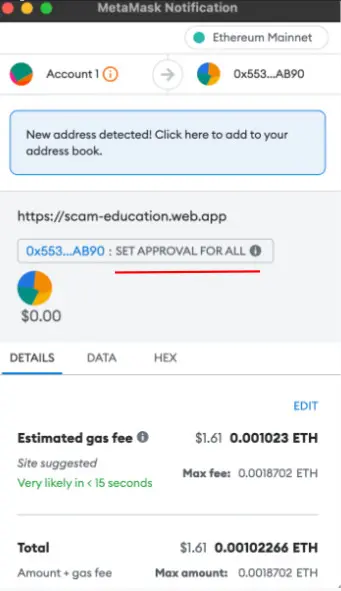
A drainer can “slip” this permission to you under the guise of WalletConnect or authorization. However, the only situations that actually require this type of approval are listing an NFT on a corresponding marketplace and interacting with a decentralized exchange. And this is indeed logical, since the platforms mentioned need permission to move tokens from your wallet during a sale or swap. However, outside of these scenarios, this function should raise concern.
So:
Minting an NFT? — This function should not be present.
Buying an NFT? — This function should not be present.
Registering in a future project? — This function should also not be present.
The SafeTransferFrom function is also used for listing NFTs on marketplaces, when you want to sell an NFT or transfer all your NFTs from one wallet to another. The SendEth function is required when transferring ETH between your own wallets, when buying coins and tokens on a specific marketplace, and also when minting your own NFT. In all other cases, the appearance of this function should raise concern.
Twitter is full of links to fake drops/mints/launchpads, which usually come with a drainer as a “bonus.”
Which networks are most commonly affected by such attacks? These are networks operating on EVM-compatible blockchains (EVM — Ethereum Virtual Machine), including Ethereum (ETH), Arbitrum, Optimism, and Polygon (MATIC), Binance Smart Chain (BSC), Avalanche C-Chain, Cardano. In other words, holders of ETH, BNB, MATIC, and similar assets should be especially cautious when interacting with cross-chain applications and when reviewing which permissions they sign.
Drainers can be divided into different categories:
- Those targeting specific wallets: MetaMask, Trust Wallet, Coinbase, SafePal, Exodus, Coin98, etc.;
- Those specialized in different blockchain networks: ETH, BSC, Polygon, AVAX, SOL, Optimism, Arbitrum, etc.;
- Those operating based on different methods: Signature, Transfer, Permit, etc.
Infection with a virus
We move on to the final point — downloading a virus with a drainer. If a virus gets onto your device, a script is launched that analyzes your wallet, identifies which assets you hold the most, and then, as soon as you try to withdraw funds from your wallet, the program generates two transactions: a user transaction and a drain transaction. The user clicks “sign transaction,” thinking they are approving only one, but in reality they are signing two at once, and they are executed one after another. In other words, the program presents you with a manipulated interface, and you sign two transactions instead of one.
The price of a drainer ranges from $1,500 to $10,000, and they are sold on various forums in the dark web or in niche communities.
The only way to protect yourself from a drainer is through basic digital hygiene rules:
- Be careful when downloading: Do not download or install software from unverified sources.
- Use antivirus software: Regularly update your antivirus software and perform system scans.
- Use hardware wallets: Storing cryptocurrency in hardware wallets that are not connected to the internet can protect against online attacks.
- Be cautious with links and attachments: Do not click suspicious links or open email attachments unless you are sure they are safe.
By following these recommendations, you can significantly reduce the risk of becoming a victim of a drainer and other forms of crypto fraud.
Good luck!